
Voice AI Agent

Enterprise Voice AI Agent for ERP, CRM and Business Operations
Give your workforce a more natural way to interact with business applications.
Compusoft Advisors’ Voice AI Agent helps employees use spoken instructions to capture information, retrieve business data and initiate configured workflows across ERP, CRM and other enterprise systems.
Designed around multilingual voice interaction and enterprise workflow integration, the solution can help Australian organisations simplify supported business processes, reduce repetitive manual entry and connect frontline activities with digital systems.
Key Capabilities
- Multilingual voice interaction, subject to supported languages and implementation
- AI-powered intent recognition and information extraction
- Voice-enabled ERP and CRM workflows
- Integration with enterprise applications through suitable APIs or connectors
- Business data validation and controlled workflow execution
- Mobile-first interaction for frontline and customer-facing teams
Bring Voice Intelligence to Everyday Business Operations
Employees regularly update inventory, record sales activities, respond to customer enquiries and capture service requests. These tasks can involve repetitive typing, navigating multiple screens and transferring information between systems.
A Voice AI Agent provides an alternative interaction method. Employees speak an instruction in a supported language, and the agent interprets the request, structures the relevant information, checks it against configured business rules and initiates the appropriate workflow.
For Australian organisations using enterprise applications, the potential use cases span customer-facing teams, warehouse operations, field service and internal business functions. Actual capabilities depend on the target applications, integration requirements and workflow configuration.


How Does an Enterprise Voice AI Agent Work?
- Speak naturally: An employee provides a question, instruction or business update through a supported voice interface.
- Recognise intent: AI processes the spoken input to identify the intended action and relevant context.
- Extract and validate: The agent structures the information into business fields and checks applicable details against configured rules.
- Review and confirm: Where required, the employee checks the proposed action and confirms important details.
- Execute the workflow: Through a configured integration, the agent retrieves information, creates or updates records, or initiates a supported business process, subject to permissions and controls.
Voice AI Agent Use Cases Across Business Functions
| Business Function | Example Voice-Enabled Workflow | Potential Benefit |
|---|---|---|
| ERP and Operations | Capture inventory movements or operational updates | Less repetitive manual entry |
| CRM and Sales | Record customer meetings, enquiries and follow-up activities | More consistent CRM records |
| Customer Service | Capture complaints and service requests | Structured information capture |
| Field Service | Record site updates and work-related information | Easier frontline reporting |
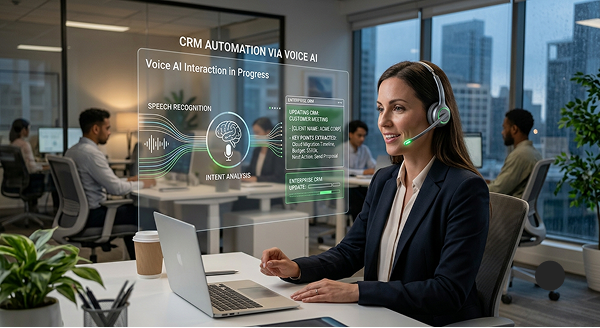
Example: Voice-Enabled CRM Updates
After a customer meeting, a sales representative could say: “Record today’s meeting with ABC Industries and create a follow-up task for Friday.”
The agent could identify the customer, meeting summary and requested follow-up, validate the details and present the proposed update for confirmation. The information would then be submitted through the configured CRM integration, subject to permissions and workflow controls.
This approach can make customer activity logging more convenient and help sales teams keep records current.
Business Benefits of Voice AI
Employee productivity
Reduce repetitive typing and screen navigation in supported workflows.
Improved information capture
Convert spoken instructions into structured records that can be checked before submission.
More accessible interactions
Support employees using available languages and familiar voice-based interaction.
CRM adoption
Make it easier to record customer activities and follow-up tasks.
Less avoidable rework
Apply validation and confirmation to help identify incomplete or inconsistent details.
Enterprise Integration, Security and Control
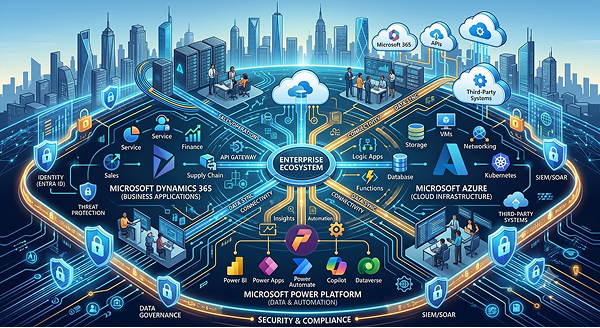
A voice-enabled workflow must work within an organisation’s existing systems and controls. Compusoft Advisors can assess integration requirements and potential solutions across Microsoft Dynamics 365, Azure, Power Platform and other suitable enterprise applications.
Implementation planning should consider:
- Application interfaces, APIs and available connectors
- User authentication, permissions and access controls
- Business validation and transaction confirmation
- Data handling, privacy, security and retention requirements
- Workflow testing and employee adoption
Language availability, offline capture and synchronisation, and specific transaction capabilities depend on the selected services and solution design.

Why Choose Compusoft Advisors?
Compusoft Advisors combines enterprise application expertise with AI capabilities to help organisations identify practical automation opportunities. Its services include Microsoft Dynamics 365 ERP and CRM, Microsoft Copilot, Power Platform, Azure and enterprise integration.
For Australian businesses, the next step is to identify a suitable voice-enabled workflow and assess its feasibility within existing enterprise applications.
Frequently Asked Questions
An Enterprise Voice AI Agent enables users to interact with digital systems through spoken instructions. It can interpret intent, structure information, retrieve relevant data and initiate configured workflows through connected applications.
Yes, it can be designed to work with suitable ERP, CRM and other enterprise applications. Feasibility depends on available interfaces, connectors, permissions and workflow requirements.
The solution is designed for multilingual voice interaction. Available languages and language-specific capabilities depend on the selected speech-processing services and implementation.